Checking who has accepted a document
See every version of a document, and exactly which version each person accepted — the question that matters once a document has been reissued.
Before you start
- You need a role that manages documents (HR or Admin).
- You see the people your role covers. If your HR or Admin role is for one branch or one team, the lists on a document show only the people in that branch or team; a role for the whole company shows everyone the document was sent to. The same document can therefore show a colleague in another branch a different list from yours.
- Open Documents from the main navigation, then select the folder the document is in. On a phone the navigation is in the More drawer.
- The screen has two tabs. Library is the one described here.
- The document needs at least one published file. A document with no file yet says so, because there is nothing anyone could have accepted.
Open the version history
- Find the document in the list.
- Press Version history.
- Press Hide version history to close it again.
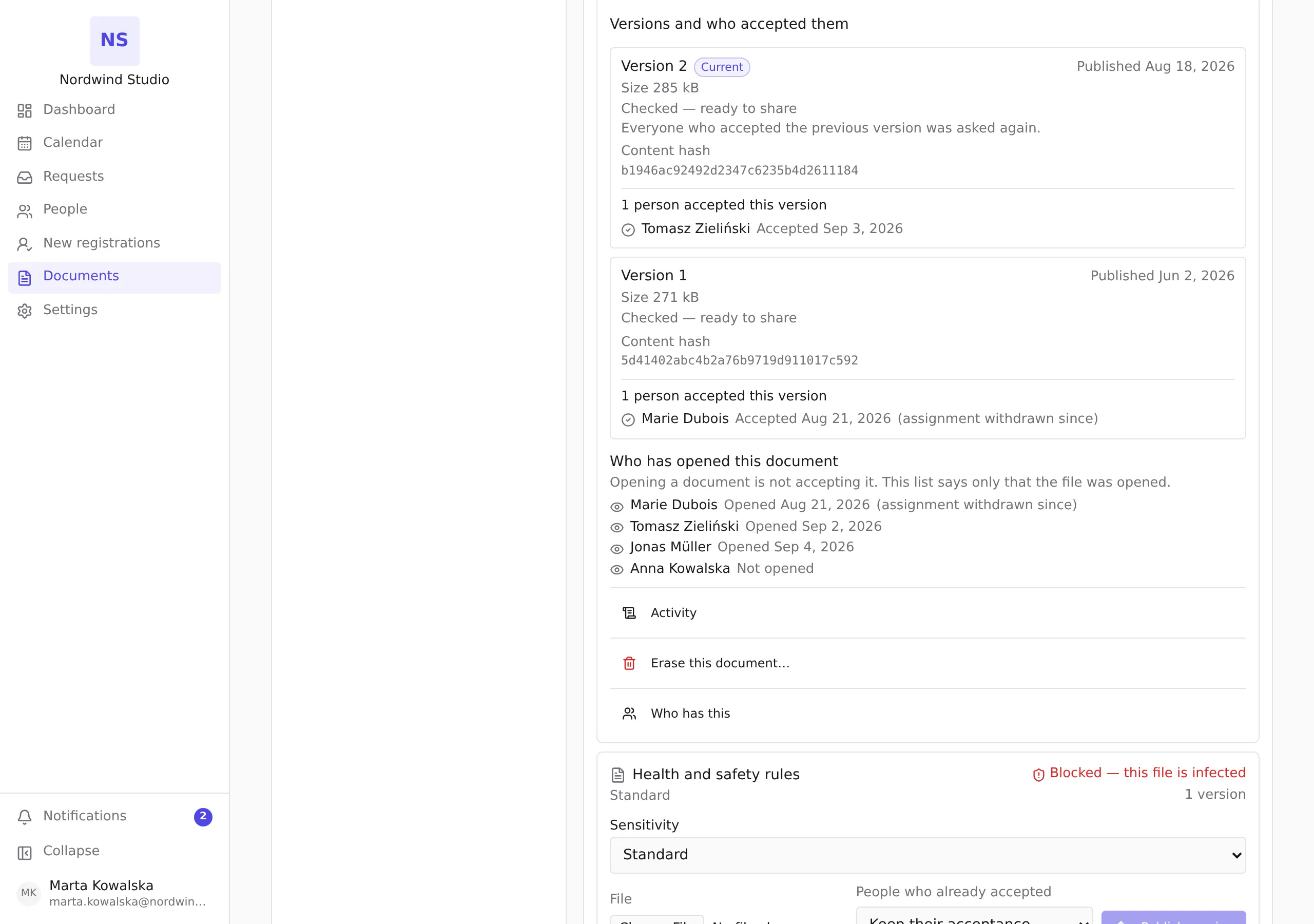
The panel is headed Versions and who accepted them, and it lists every version newest first. The newest one carries a Current badge.
What each version tells you
- Published — the date that version went out.
- Size — how large the file is.
- The checking status, in the same words the library uses: Checked — ready to share, Still checking this file…, Blocked — this file is infected, or Couldn’t be checked — nobody can open it yet.
- Content hash — a fingerprint of the exact file that was published, shown in full so that you can compare it with one somebody else quotes. It never changes, because a version’s content never changes: publishing different content creates a new version.
- From the second version onward, what that version did to the acceptances of the one before it — either Everyone who accepted the previous version was asked again. or Acceptances of the previous version were carried forward. You chose this when you published the file.
Who accepted which version
Under each version is the list of people who accepted that version, earliest first, with the date each of them did it. A version nobody has accepted says Nobody has accepted this version.
This is the question the roster on Who has this cannot answer. There, a person shows as accepted or not. Here you can see that eleven people accepted version 1, four have accepted version 2, and therefore who is still standing on the old handbook.
A person who is no longer assigned can still appear here. Their line is marked (assignment withdrawn since). Withdrawing an assignment pulls the document back; it never removes the acceptance, because the acceptance is evidence that the person accepted that exact version on that date, and that remains true afterwards.
Who has opened it
Below the versions, under Who has opened this document, is a separate list of everyone your role covers that the document is assigned to, and when they first opened it — or Not opened if they never have.
This is deliberately kept apart from the acceptances, and it is the weaker fact of the two. Opening a document is not accepting it. Somebody who opened it and did nothing else has told you they saw it; somebody who accepted it has stated that they read it and accept its contents. The two are never shown side by side, so that the weaker one cannot be mistaken for the stronger.
It is still worth having, because without it “never opened it” and “opened it and did not accept” would look identical, and those two call for different conversations.
Who has read it — a different question again
Version history answers “who accepted which version”, and it only knows about the people the document was assigned to. For “who has opened or downloaded this at all”, press Activity on the same card.
The activity list is the document’s whole history — publications, assignments, acceptances and reads — newest first, and it says who did each thing and when. Two things about it are worth knowing:
- Opening the activity list is itself recorded, and you will see your own visit in it the next time you open it. A record of who read something that made an exception for the one read nobody else can see would be exempting exactly the read it exists to record.
- A line can say “account removed” where a name would be. That is somebody whose account has since been deleted: the record of what they did survives them, which is the point of keeping it, but there is no longer a person to name.
What this screen does not tell you
- It does not change anything. Nothing on the version history can be edited; it reports what has already happened. Erasing the document is a separate control on the same card — see How long documents are kept, and what erasing one removes.