Set absence limits and enforcement
Configure which absence types a leave policy allows, how many days of each are available, where the days are drawn from, and whether exceeding a limit warns the approver or blocks the request outright.
Before you start
- You need the HR or Admin role for the policies you configure.
- Policies start as copies of country templates (for example the Polish template with vacation, on-demand leave, and sick leave). A copy belongs to your organization: template updates never change it, and every value in it — including statutory-looking ones — is yours to edit.
Where to find it
Open Settings in the sidebar, then choose Leave policy under Organization. On a phone, tap More, then Settings, then Leave policy. The Leave policy section shows your policy’s configuration exactly as the system computes with it: the accrual pools, the Allowed absence types with their limits, and the Approval flow. If your company has several policies, pick one from the Policy selector at the top; the line next to it (for example “In force since Jan 1”) tells you which configuration window you are looking at.
The page works on a phone, but it is designed for a desk: on a larger screen the example-employee preview sits beside the configuration instead of below it.
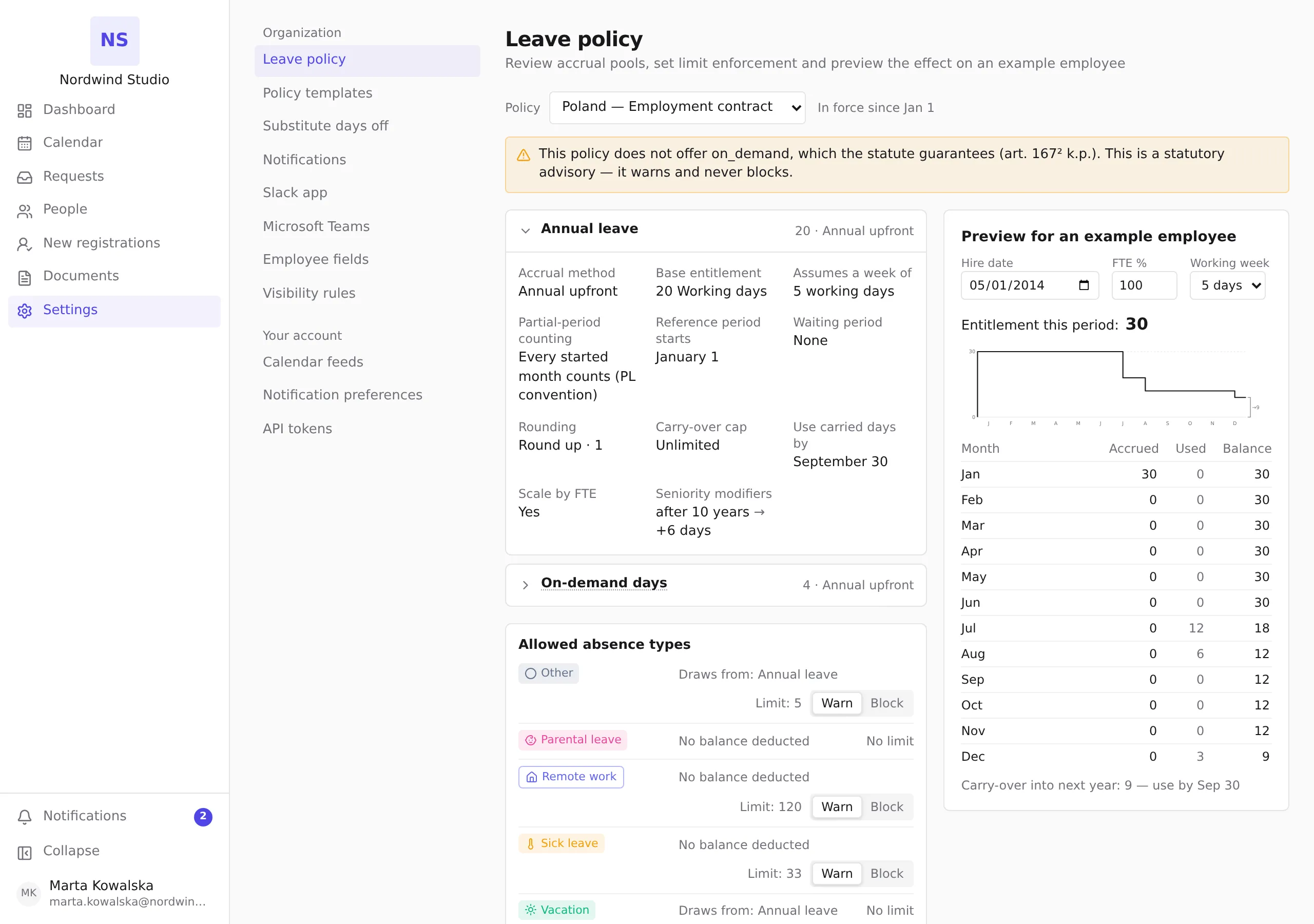
In this release the pools, type mappings, and limits are shown for review — they are set up together with your policies. What you change here is the enforcement mode on each limited type: the Warn / Block toggle on its row. The note under the list is literal: Changes here are recorded in the audit log.
Allowed types, buckets, and limits
A leave policy lists its allowed absence types. For each type you decide:
- Which bucket it draws from. Each type draws from exactly one accrual bucket — the pool its days are deducted from. Several types can share a bucket: in the Polish template, vacation and on-demand leave both draw from the base vacation entitlement. The row shows this as Draws from: followed by the pool’s name.
- A limit (optional) — the maximum number of days of this type within the reference period (for example: on-demand leave, 4 days per year). Rows without one show No limit.
- The enforcement mode for that limit — see below.
Reported types (such as sick leave) are usually not mapped to any bucket: their days are tracked and counted against their limit, but no balance is reduced — their row shows No balance deducted. See Record sick leave for an employee.
Enforcement modes: warn or block
Every limit has its own enforcement mode — this is per limit, not a global switch:
- Warn (default) — an exceeding request goes through; the approver sees the warning and may approve anyway. Approving despite a warning is recorded in the audit trail, so overrides are always attributable.
- Block — an exceeding request is rejected at submission and at approval, with a message naming the limit. A blocked limit also stops absences recorded on behalf and is never bypassed by automatic approval.
You can mix modes freely: block on-demand overruns while only warning on home-office days.

Statutory values never block
Legal minimums and statutory thresholds appear as informational hints next to your configuration — for example when you set vacation below the Polish statutory 20/26 days, or when a recorded sick leave crosses the 33-day statutory sick-pay period. These hints warn; they never block, and you can configure values above or below them. The system tracks absence; it is not an arbiter of law.
Changing a policy later
Policy changes are effective-dated: balances and past requests are priced against the configuration valid at the time, and history is recomputed deterministically from the change point — never rewritten by hand.
Switching a limit between Warn and Block is the exception: the mode is not a priced quantity but a rule for future decisions, so a switch takes effect immediately for every request submitted or approved from that moment on. Requests decided earlier keep their recorded warnings and approvals unchanged, and every switch is recorded with who changed it and when.