Setting how often people are reminded about documents
Dieser Inhalt ist noch nicht in deiner Sprache verfügbar.
When you send someone a document to accept, Pauzora reminds them until they accept it. You decide how soon the first reminder goes out, how often after that, and how many reminders a person can get in total. You can also switch reminders off.
Reminders are on from the start. An organization that has never changed these settings uses the defaults: the first reminder after 3 days, then one every 7 days, up to 3 reminders per document version.
Before you start
- Your organization needs the Documents module. Without it the reminder settings do not appear at all.
- You need the Settings → Organization → Notifications section. It appears for administrators and HR. If you cannot see the Organization group in Settings, you do not have this permission.
Change the reminder schedule
- Open Settings.
- Under Organization, open Notifications.
- Scroll to Remind people about documents they haven’t accepted.
- Fill in the three numbers:
- Days before the first reminder — from 1 to 90.
- Days between reminders — from 1 to 90.
- Reminders per document version, at most — from 0 to 10.
- Select Save reminder settings. Saved. appears under the numbers.
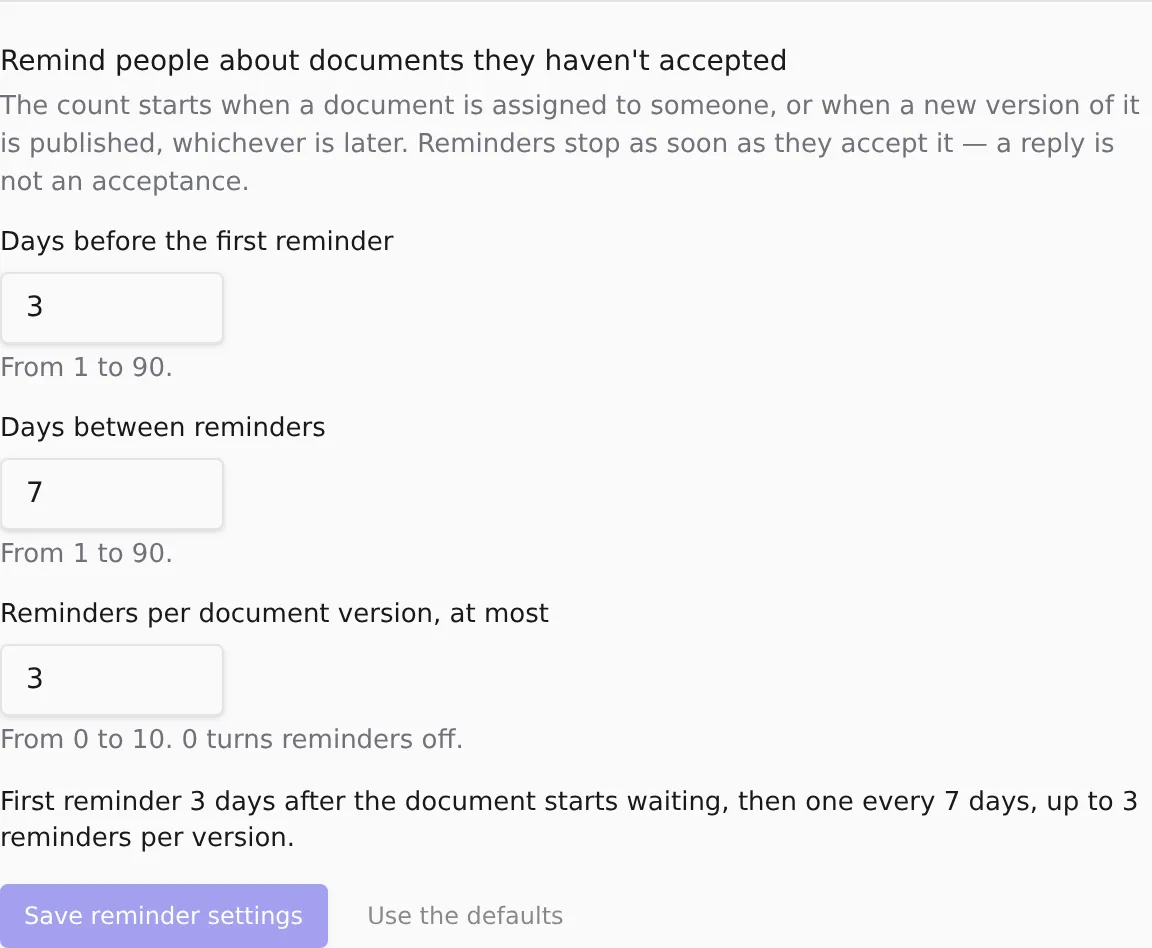
Below the numbers, a sentence describes the schedule in words, for example First reminder 3 days after the document starts waiting, then one every 7 days, up to 3 reminders per version. It updates as you type, before you save, so you can check what you are about to set.
To go back to the defaults, select Use the defaults, then Save reminder settings. Nothing changes until you save.
When the count starts, and when reminders stop
The count starts at whichever comes later:
- the day the document was assigned to the person, or
- the day the latest version of the document was published.
So publishing a new version starts the count again for everyone who still has to accept it. A new version is a new thing to accept, so the reminder limit applies to each version separately.
Nothing the person does stops reminders except accepting the document. A reply is not an acceptance: if someone replies to ask a question, they keep getting reminders until they accept. Withdrawing the assignment also ends them, because the person no longer owes anything.
A person never gets more reminders for one version than the limit you set, even if Pauzora missed a day and is catching up. A catch-up sends only the reminder that is due now, never the ones that were missed.
Switch reminders off
Set Reminders per document version, at most to 0 and select Save reminder settings. The sentence below the numbers changes to Reminders are off. The two day fields keep their values, so switching reminders back on later restores the timing you had.
Switching reminders off does not change anything else. The documents stay assigned, and you can still see who has not accepted them.
Troubleshooting
I can’t see the reminder settings. Check that your organization has the Documents module and that you can see the Organization group in Settings. Both are required.
Save reminder settings stays greyed out. Either nothing has changed since the last save, or a number is outside its range. A number outside its range is shown in red, with the allowed range under it.
Someone says they got a reminder after they replied. That is expected. A reply is not an acceptance. Ask them to accept the document; that is what stops the reminders.
Related
- Assigning a document and choosing what people must do
- Checking who has accepted a document
- Reminders about a document waiting for you — the same reminders, from the side of the person receiving them.
- Reading and accepting a document sent to you — what the person you are reminding sees.