Preview a policy for an example employee
Dieser Inhalt ist noch nicht in deiner Sprache verfügbar.
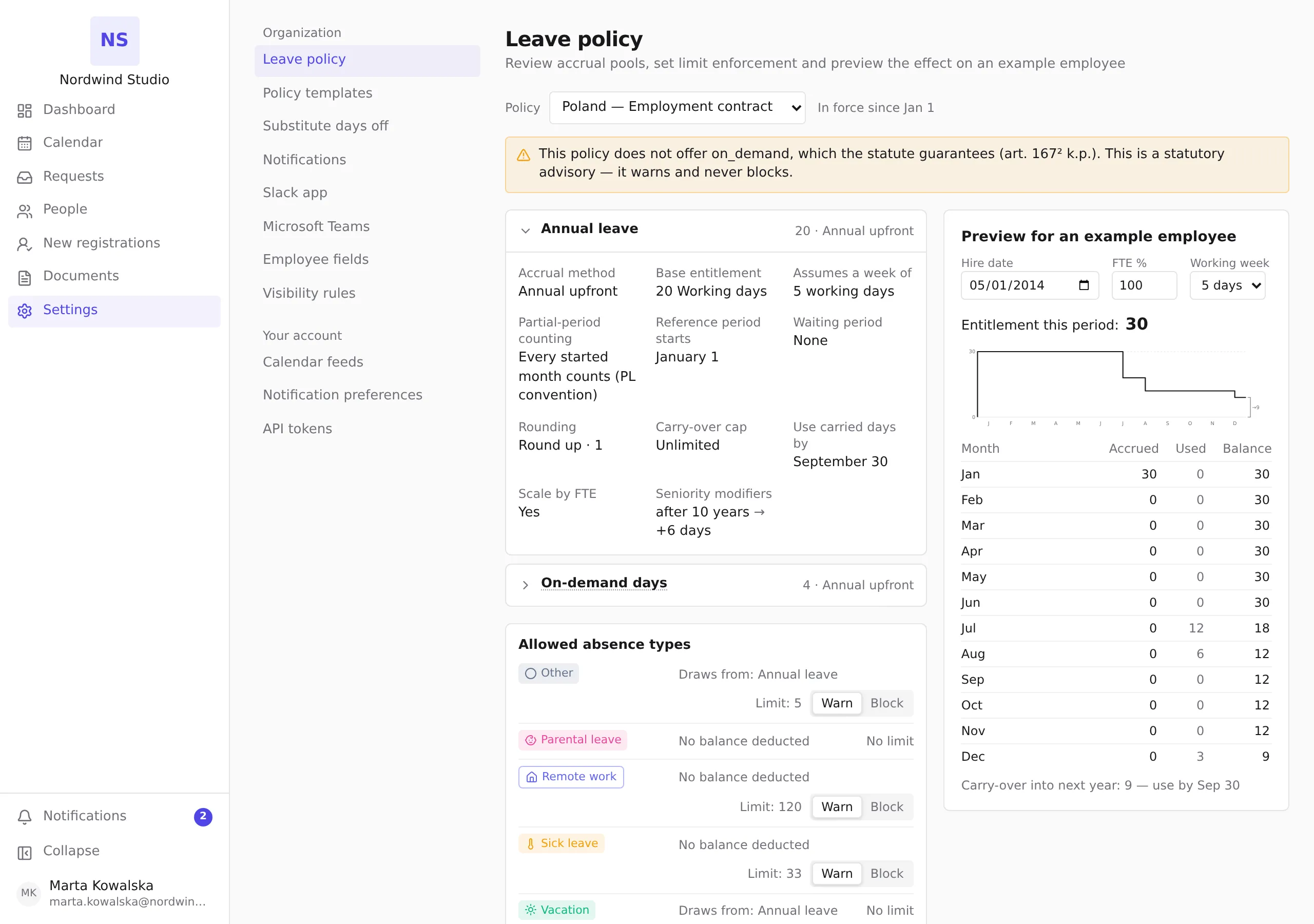
See what a leave policy grants over a year to an imagined employee — a hire date, a working time and a working week you choose — before a real person’s balance is involved.
Before you start
- You need the HR or Admin role. The preview sits on the Leave policy page in Settings, under Organization.
- The preview is an illustration. It reads nobody’s balance, writes nothing, and changing its fields changes nothing in your organization.
Steps
- Open Settings, then Leave policy under Organization, and pick the policy in the Policy selector.
- Find Preview for an example employee — beside the configuration on a large screen, below it on a smaller one.
- Set the example employee:
- Hire date — when they joined. A long-serving employee shows the policy’s seniority steps, if it has any.
- FTE % — their working time, from 10 to 100; 100 is full time.
- Working week — 5 days or 6 days.
- Read the result. Entitlement this period is what the policy grants this employee in the current reference period. The chart and the table below it show the year month by month: Accrued, Used and Balance. When days are left over at the end of the year, a line such as Carry-over into next year: 9 — use by Sep 30 follows the table.
Every change recalculates the preview at once.
What the preview does not tell you
- The Used column is invented. The preview spends a fixed, made-up pattern of days during the year so that the balance and the carry-over have something to show. It is the same pattern for every policy and every example employee — it is not a forecast.
- It ignores your branch calendars. Public holidays and a branch’s own working week do not enter the preview.
- Carry-over is simplified. When a policy has several pools, the preview applies the first pool’s carry-over cap and deadline to the combined balance.
- Age-based entitlement is not previewed. The example employee has no birth year, so an age step in the policy does not apply here.
A real employee’s balance is always computed by Pauzora from the policy’s full configuration and their own record, and it is the one shown on their dashboard.