Choose which email addresses can register
Decide which work email domains may register themselves in your organization, from Settings → Email domains.
Before you start
- You need the Admin role for the whole company. HR and Admins of a single branch don’t see Email domains under Settings, because the list opens registration to every branch at once.
- A domain on the list lets people ask to join. They become members only when HR activates them — see Approve new registrations.
- When you signed your company up, Pauzora added the domain of your own address, unless it belongs to a public provider such as gmail.com.
Steps
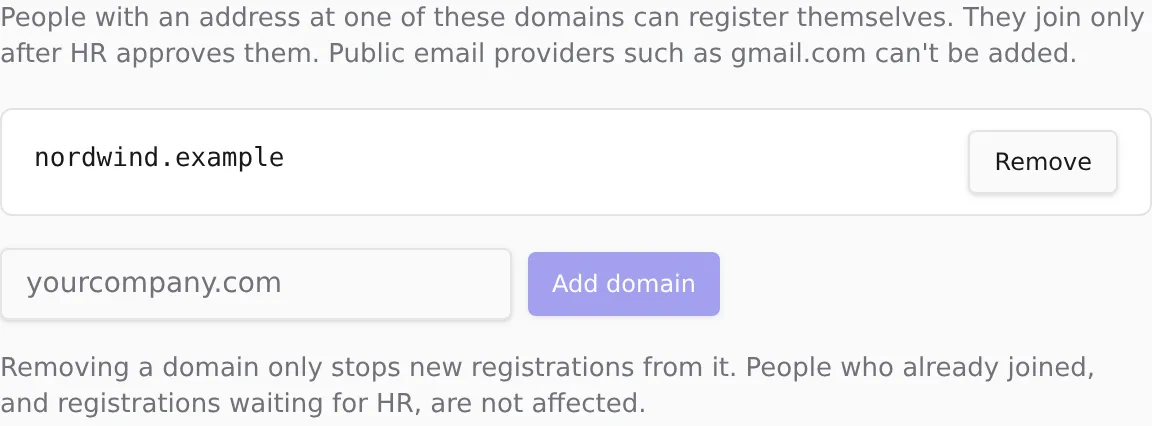
- Go to Settings → Email domains. The list shows every domain whose addresses can register themselves.
- Type the domain into Email domain, for example
yourcompany.com, and choose Add domain. Type only the part after the @. Pauzora stores it in lower case, soYourCompany.comandyourcompany.comare the same domain. - To stop new registrations from a domain, choose Remove next to it.
What happens next
- People with an address at a listed domain can register on your organization’s sign-in page and wait for HR to activate them.
- Someone who tries an address at a domain that is not listed is told that your company doesn’t accept registrations from it. Nothing about any person is revealed: whether an address already has an account, or was rejected before, never shows.
- Removing a domain only stops new registrations. People who already joined keep their accounts, and registrations already waiting for HR stay in the queue.
If something does not work
- ”… is a public email provider and cannot be a company domain” — addresses at free mail providers can’t identify your company, so they can’t register themselves. Ask those colleagues to use their work email.
- “This domain is already on the list.” — it is there already, perhaps typed in different capitals.
- Your company uses more than one domain — add each of them.
Related
- Approve new registrations
- Create your account — what your colleagues see
- Set up your company