See your monitoring level and the notices sent to you
Find out which monitoring level applies to you, what it records, and which notices about a change of level were sent to you and when.
Where to find it
Open Time in the menu and scroll to Your monitoring level. It is below the week and above Your paired computers.
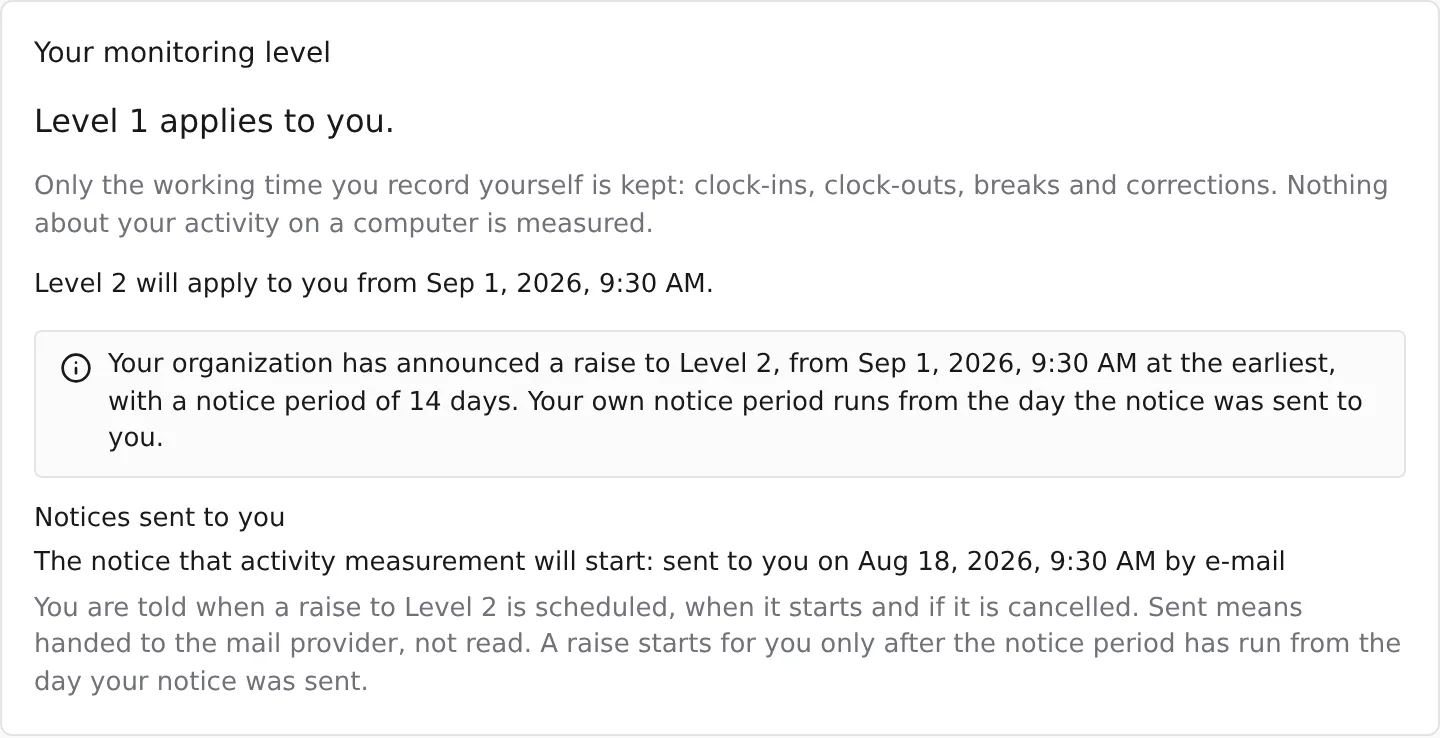
What each level means
- “Level 1 applies to you.” Only the working time you record yourself is kept: clock-ins, clock-outs, breaks and corrections. Nothing about your activity on a computer is measured.
- “Level 2 applies to you.” In addition, the Pauzora desktop app sends one percentage for every 10 minutes you work: how much of that time the keyboard or mouse was used. It never records what you type or click, or what is on your screen. See What the desktop app measures at Level 2.
Notices sent to you
Under Notices sent to you the page lists every notice about a change of level that was sent to you, with the date. You are told when a raise to Level 2 is scheduled, when it starts and if it is cancelled. If none was sent, the page says “No notice about a change of level has been sent to you.”
Sent means handed to the mail provider, not read. The date is when your organization’s Pauzora gave the e-mail to the mail provider.
When a raise starts for you
A raise to Level 2 starts for you only after the notice period has run, counted from the day your notice was sent. Until then Level 1 applies to you and nothing is measured. If the page says the notice has not been sent to you yet, the period has not started; check that your e-mail address in Pauzora is correct and ask your administrator.