Correct your time or add time you worked
Fix a clock press that is wrong, remove an entry, or add time you worked without the clock, from the Time page. Every change carries a reason, and nothing is overwritten.
Before you start
- Your organization uses time tracking. If the page says “This feature is not enabled for your organization.”, ask an administrator.
- You have an employee record in your organization. Your time is recorded against it.
See who recorded each entry
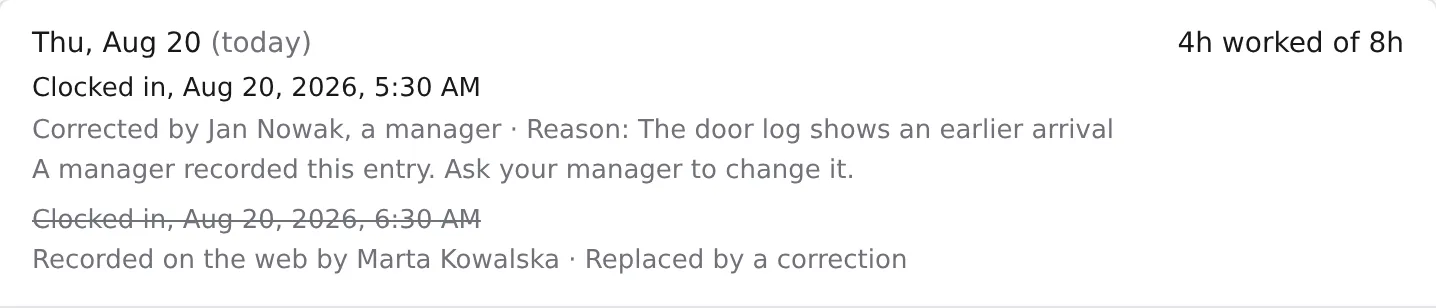
Open Time in the menu. Under This week, every day lists its entries: clock-ins, clock-outs, breaks and time added by hand. Under each entry the page says where it came from, for example “Recorded on the web by …”, “Recorded by the desktop app” or “Corrected by …, a manager”, and the reason when there is one.
Add time you worked
Use this when you forgot to clock in, or worked away from your computer.
- Under Add time you worked, click Add time by hand.
- Enter where the time starts (From (date), From (time)) and where it ends (To (date), To (time)). Times are in your branch’s time zone.
- Type a Reason. It is required.
- Click Save time.
An entry can be at most 24 hours long and cannot end in the future. For a longer stretch, add each day as its own entry.
Correct an entry
- Under the day, find the entry and click Correct this entry.
- Change the date and time, or tick Remove this entry without replacing it.
- Type a Reason and click Save correction.
Nothing is deleted. The old entry stays on the day, struck through and marked “Replaced by a correction”, and the new one appears beside it with your reason. If you send the same form again after a failure, it is recorded once.
Entries a manager corrected
If a manager corrected an entry, it shows “Corrected by …, a manager” and their reason, and the page says “A manager recorded this entry. Ask your manager to change it.” You cannot change that entry yourself.
If something is refused
- “An entry can’t be longer than 24 hours. Record each day as its own entry.”
- “Please give a reason.”
- “The end must be later than the start.”
- “Time can’t be recorded in the future.”
- “This entry has already been corrected. Reload the page to see it.”
- “Your organization is read-only, so time can’t be changed right now.” See When your organization is read-only.